

![[object Object]](/media/2025/12/electrum-wallet-1.jpg?w=1920)
When it comes to Bitcoin-only storage, Electrum keeps showing up in my toolkit. This Electrum wallet review breaks down everything you need to know before trusting this veteran software with your satoshis.
Pros and Cons of Electrum Wallet
- Open-source and auditable code
- Lightweight — no full node required
- Advanced features like multisig
- Bitcoin-only (no altcoin support)
- Outdated user interface
- Steeper learning curve for beginners
What Is Electrum Wallet?
Electrum is a lightweight Bitcoin wallet that launched in November 2011. Created by Thomas Voegtlin, it pioneered the concept of Simple Payment Verification (SPV) — meaning you don't need to download the entire blockchain to send and receive BTC. While full nodes require hundreds of gigabytes, Electrum works instantly on modest hardware.
The wallet operates as a "thin client," connecting to remote servers that handle the heavy lifting. This approach delivers speed without sacrificing security. Your private keys never leave your device. They're generated locally, encrypted locally, and stay under your exclusive control.
For Bitcoin maximalists who prioritize sovereignty over flashy interfaces, this electrum bitcoin wallet remains a top choice. The codebase is fully open-source under the MIT license, allowing security researchers worldwide to audit every line. Thousands of eyes have reviewed this code over fourteen years, building confidence through transparency.
Key Features That Matter
The electrum crypto wallet packs serious functionality beneath its minimalist exterior. Understanding these capabilities helps you maximize the software's potential:
- Seed Phrase Recovery: Generate a 12-word seed during setup. This backup phrase restores your entire wallet on any device — essential when you're hopping between time zones or replacing hardware.
- Multisignature Support: Create wallets requiring multiple signatures for transactions. The electrum multisig wallet feature appeals to businesses and security-conscious holders managing significant amounts.
- Hardware Wallet Integration: Connect Ledger, Trezor, Coldcard, or BitBox devices seamlessly. This transforms Electrum into a powerful cold storage interface combining hardware security with software flexibility.
- Replace-By-Fee (RBF): Stuck transaction? Bump the fee without waiting. Invaluable when Bitcoin network congestion spikes unexpectedly.
- Custom Fee Selection: Set exact satoshi-per-byte rates. Pay premium for speed or minimize costs during low-traffic periods. The mempool visualization helps you choose wisely.
- Lightning Network Support: The latest versions include Lightning functionality for instant, low-cost micropayments. Perfect for daily spending while keeping main holdings in cold storage.
- Coin Control: Manually select which UTXOs to spend. Privacy enthusiasts appreciate this granular control over transaction inputs.
- Watch-Only Wallets: Monitor addresses without exposing private keys. Ideal for tracking cold storage balances securely.
How Electrum Compares to Other Bitcoin Wallets
Choosing the right wallet depends on your priorities. Here's how Electrum stacks up against two popular alternatives in this cold storage wallet review:
| Feature | Electrum | Exodus | BlueWallet |
|---|---|---|---|
| Supported Coins | Bitcoin only | 250+ cryptos | Bitcoin only |
| Open Source | Yes | No | Yes |
| Hardware Support | Yes | Yes (limited) | Yes |
| Lightning Network | Yes | No | Yes |
| Multisig | Yes | No | Yes (advanced) |
| Mobile App | Android only | iOS & Android | iOS & Android |
| Beginner Friendly | No | Yes | Moderate |
| Custom Fees | Full control | Limited | Full control |
| Price | Free | Free | Free |
| Best For | Power users | Multi-asset holders | Mobile-first users |
Exodus wins on polish and multi-asset support, making it ideal for those holding diverse portfolios. BlueWallet offers better mobile experience with similar Bitcoin-centric philosophy. Electrum dominates for desktop users wanting maximum control and advanced features unavailable elsewhere.
Security Deep Dive
Security defines the platform's reputation in the crypto community. The wallet uses industry-standard AES-256-CBC encryption and keeps your private keys stored locally on your device only.
The seed phrase generates deterministic keys — lose your device, and that 12-word backup reconstructs everything instantly. This hierarchical deterministic (HD) structure means one seed creates unlimited receiving addresses, improving privacy through automatic address rotation after each transaction.
Electrum supports two-factor authentication through Trusted Coin's service. Enable this, and every transaction requires confirmation via your phone or secondary device. It adds friction but dramatically reduces theft risk from compromised computers.
Server connections use SSL encryption by default. For maximum privacy, route Electrum through Tor with built-in proxy support. Your IP address stays hidden from servers you connect to.
One critical warning: phishing attacks have targeted Electrum users repeatedly. Always download from electrum.org directly. Verify PGP signatures when possible. The legitimate wallet never prompts you to enter seed phrases into pop-up windows. Fake versions distributed through GitHub impersonators and malicious ads have stolen millions in BTC over the years.
Setting Up Your Electrum Wallet
Installation takes under five minutes. Download the appropriate version for Windows, macOS, Linux, or Android from the official website. The electrum wallet app weighs roughly 50MB — refreshingly small compared to full-node solutions.
Upon launch, you'll choose between creating a new wallet or restoring an existing one. Standard wallets suit most users. Advanced options include multisig configurations and watch-only setups for monitoring cold storage addresses.
Write down your seed phrase on paper immediately. Never store it digitally — not in photos, cloud documents, or password managers connected to the internet. This seed represents total access to your Bitcoin. Treat it accordingly with physical backups in secure locations.
Set a strong password for the wallet file. This encrypts your local data, adding protection if someone accesses your computer.
How to Use Electrum Wallet Effectively
Receiving Bitcoin requires just your wallet address. Navigate to the Receive tab, generate a new address, and share it with senders. QR codes simplify mobile transfers. New addresses appear automatically after each use.
Sending works intuitively through the Send tab. Enter the recipient address, specify the amount, adjust fees, and broadcast. Preview transactions before confirming.
The History tab logs every transaction with confirmations, timestamps, and labels you assign. Export capabilities support CSV format for accounting purposes.
User Experience Reality Check
Let's address the elephant in the room: Electrum looks dated. The interface hasn't seen significant visual updates in years. Tabs, buttons, and menus feel utilitarian rather than beautiful. Modern design trends passed this software by.
For newcomers to crypto, this creates real barriers. Terms like UTXO, gap limit, and server selection confuse without context. The wallet assumes baseline technical knowledge that beginners simply don't have yet.
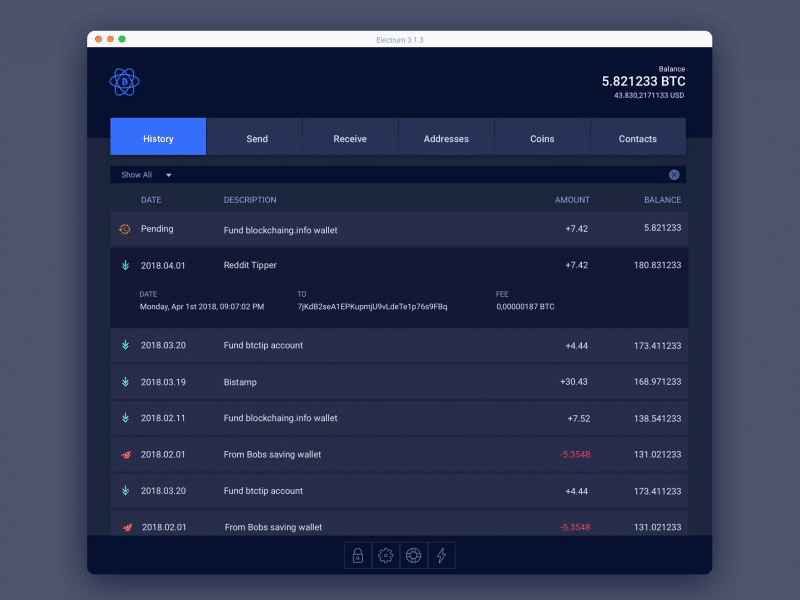
However, functionality compensates for aesthetics consistently. Every feature works reliably without crashes. Transaction broadcasting happens quickly across network conditions. Balance updates appear near-instantly after confirmations. The software rarely freezes or requires restarts.
Power users appreciate the no-nonsense approach deeply. You won't find NFT galleries, DeFi integrations, or promotional content cluttering the interface. Electrum does one thing — Bitcoin storage and transactions — exceptionally well. That focused simplicity appeals to serious holders.
Transaction Fees and Costs
Electrum itself charges absolutely nothing. The wallet is completely free to download, install, and use indefinitely. No premium tiers, no subscription models, no hidden monetization.
Network fees remain your only cost. Bitcoin miners require payment to include your transaction in blocks. Electrum lets you customize these fees with precision unavailable in most wallets. Choose from preset options (economical, normal, priority) or input exact satoshi-per-byte values manually.
The fee slider displays estimated confirmation times based on current mempool conditions. During busy periods, higher fees guarantee faster processing. When the mempool clears during quiet weekends, minimum fees work perfectly. This flexibility saves significant money compared to wallets with fixed fee structures.
Platform Availability
Electrum supports most desktop operating systems comprehensively. Windows, macOS, and Linux users enjoy full functionality including all advanced features. The software even comes pre-installed on Tails OS — the privacy-focused operating system favored by journalists, activists, and security professionals globally.
Android users can install Electrum from Google Play or download the APK directly from the official website. The mobile version includes core features though some advanced options remain desktop-exclusive. It works well for basic sending and receiving.
iOS users face disappointment here. No official iPhone app exists currently. Apple's restrictive App Store policies and development priorities have kept Electrum off the platform indefinitely. BlueWallet or Muun serve iPhone users better as alternatives.
Who Should Use Electrum Wallet?
This wallet serves specific audiences exceptionally well. Consider Electrum if you match these profiles:
- Long-term Bitcoin holders seeking battle-tested storage solutions
- Privacy-conscious users wanting coin control and Tor support built-in
- Technical users comfortable with non-intuitive interfaces and terminology
- Businesses requiring multisignature authorization for treasury management
- Hardware wallet owners needing powerful companion software
- Lightning Network experimenters exploring layer-2 payment solutions
- Security researchers appreciating open-source verification
Beginners might struggle initially with the learning curve. If you're buying your first Bitcoin, simpler wallets like Exodus or Coinbase Wallet offer gentler introductions. Return to Electrum once you understand the fundamentals of Bitcoin storage.
Recent Updates and Development
The development team remains active after fourteen years. Recent versions introduced native SegWit support, reducing transaction fees significantly. Lightning Network integration continues improving with each release.
Version 4.5 brought enhanced hardware wallet support and better coin selection algorithms. The developers maintain transparent communication through GitHub and community forums.
This consistent development reassures users about longevity. Many crypto projects fade after initial hype. Electrum's sustained progress demonstrates genuine commitment to Bitcoin infrastructure.
The Verdict
Electrum earns its reputation as the thinking person's Bitcoin wallet deservedly. Raw functionality trumps visual appeal every time. Security features satisfy even paranoid holders concerned about sophisticated attacks. The open-source foundation enables community verification of every claim made.
The learning curve filters out casual users — arguably a feature rather than bug for those who remain. Those who invest time understanding Electrum's capabilities gain powerful tools unavailable in consumer-focused alternatives anywhere.
For pure Bitcoin storage combining security, control, and advanced features, few wallets compete seriously. Just ensure you download from official sources only, backup your seed phrase properly offline, and embrace the utilitarian design philosophy. Your future self will thank you.
FAQ About Electrum Wallet
Is Electrum Wallet Safe?
Yes, when downloaded from official sources. Electrum uses proven encryption standards and stores private keys locally on your device exclusively. The open-source code has been audited by security researchers continuously since 2011. However, fake versions distributed through phishing campaigns have stolen user funds repeatedly. Always verify you're downloading from electrum.org and check digital signatures before installation.
Is Electrum Only BTC?
Electrum supports Bitcoin exclusively by design. The developers intentionally focus on one cryptocurrency rather than diluting efforts across multiple assets. This Bitcoin-only approach enables deeper feature development and security hardening unavailable in multi-coin wallets. If you need multi-asset storage, consider Exodus or Trust Wallet instead.
How to Backup Electrum Wallet?
Write down your 12-word seed phrase on paper during initial wallet creation. Store this backup securely offline — preferably in multiple physical locations like a safe and safety deposit box. To restore your electrum wallet on any device, select "I already have a seed" during setup and enter your words in correct order. Additionally, export your wallet file through File > Save Copy for encrypted local backups. Never store seed phrases digitally or share them with anyone under any circumstances.
Last updated: December 2025. Testing conducted on Electrum version 4.5.x across Windows 11 and Android 14 devices by the author.
![[object Object]](/media/2025/12/Crypto.com-wallet.jpg?w=1920)
![[object Object]](/media/2025/12/coinbase-wallet.jpg?w=1920)
![[object Object]](/media/2025/12/zengo-wallet.jpg?w=1920)
![[object Object]](/media/2025/12/Safepal-Wallet.jpg?w=1920)
![[object Object]](/media/2025/12/coinomi-wallet-review.jpg?w=1920)
![[object Object]](/media/2025/12/atomic-wallet.jpg?w=1920)